
Generate BDD style documentation without step definitions or complex workflows. Pepper puts quality center stage and empowers teams that rely on their test engineers.
dotnet add package PepperBDD
[StepDescription("Navigate to the login page")]
public void NavigateTo()
{
    driver.Navigate().GoToUrl("https://app.example.com/login");
}

[StepDescription("Enter username '{username}'")]
public void EnterUsername(string username)
{
    usernameField.SendKeys(username);
}[Test]
[CaseDescription("Verify user can log in with valid credentials")]
public void Login_ValidateSuccess()
{
loginPage.NavigateTo();
loginPage.EnterUsername("test@example.com");
loginPage.EnterPassword("password123");
loginPage.ClickLogin();
Assert.That(dashboard.IsDisplayed(), Is.True);
}pepper -generateReport -project "./MyTests" -output "TestDocs.pdf"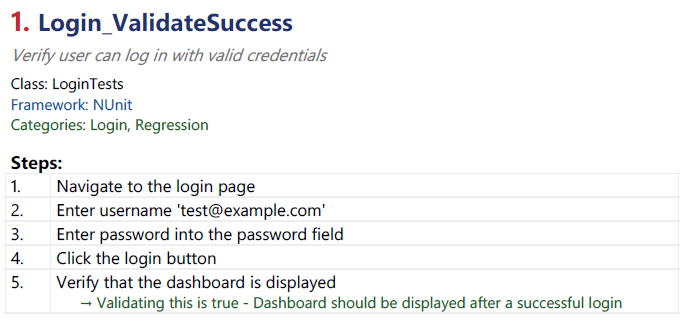
Use .pdf or .html extension to choose your output format.
Traditional BDD primarily benefits teams where all members of R&D participate in creating tests. However, for some organizations this approach is not practical.
Pepper keeps the business language tied to the actual method implementations while still providing the same benefits of BDD. No need for Step Definitions or Gherkin Syntax.
Pepper rewards best practices test implementations with powerful tools that can:
Pepper's BDD approach is perfect for AI workflows.
Feed test data to LLMs to generate new test cases, identify coverage gaps, or create bug reports. Your test documentation becomes a foundation for intelligent automation.